 Updated 12/27/2018
One of the most important directory listings on the Internet for a small business is the Google My Business listing. This online directory integrates the Google Maps listing with the Google Knowledge Panel, Google Reviews and even YouTube. It is critical for small businesses to claim or create and optimize their Google My Business account to improve ranking in a Google search result and for increased search engine visibility.
When embarking on this local SEO strategy, many businesses find that their Google Maps listing has already been claimed by someone unknown to the business. In this case, there are a series of steps that need to be taken to claim a Google listing that is already verified. Good luck and have patience on your quest to enhance this important digital footprint!
- You must first decide what email address you want to use to ‘claim’ the business listing. It is recommended that an email address be used that is connected to the business domain name such as webmaster@mywebsite.com.
- Google requires that the email address being used to claim the local business, be connected to a Google Apps account. If the email address being used is already connected to Google Apps, go to step 4. If it is not connected to Google Apps, you will need to create a Google account and choose the option “I prefer to use my current email address.”
- Go to Google My Business and click “Start Now” http://www.google.com/business and either login, if using an existing email address connected to Google or select ‘create an account’ and associate a new email address with Google.
- Type in the address of the business you want to claim.

5. You will see a message that says, “Someone else manages this business on Google”

6. Select “Share your info with the current owner to continue”
7. Select Appropriate response for “What level of access would you like?” (e.g. 3rd party marketing company would choose “Management”)
8. Select Appropriate Response for your “relationship to the business” (e.g. Owner of the business would choose owner)
9. Input information in all the fields provided (e.g. Contact name, telephone number, and Agency name) and “Submit”
10. A response will be sent to the gmail account you are using to claim the profile (Reference image below). Make sure to keep this email in a place you can easily locate it, as it will be necessary for the next steps.
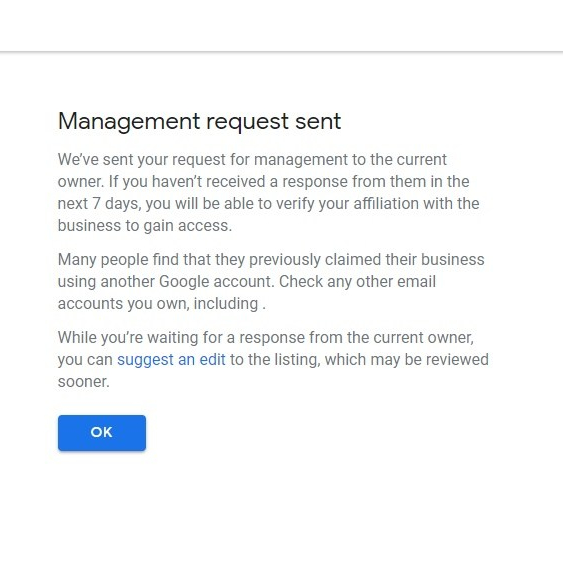
11. Then, the waiting begins. Once the allotted time, 7 calendar days, has passed, it is now possible to manage the profile without permission from the current owner. Locate the email you received from Google 7 days ago and click the “ok” button at the bottom of the message. Next, fill out the required information for the Google business listing. Lastly, you will be asked to “verify the account” with one of the following methods (e.g. Phone call, business email, or postcard by mail).
-
(The screenshot below is for reference only and may not accurately reflect all of the verification options you will see on your screen.)

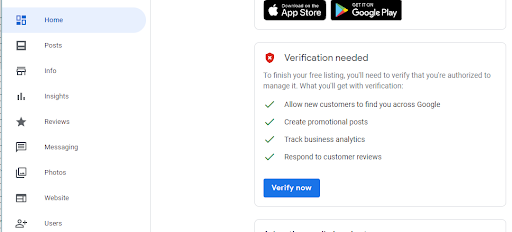
12. The person who verifies should expect to receive either a 5 or 6 digit code (e.g. via by phone, business email or postcard). Once the code is received, locate the verification needed (reference image below) under the Home section of your profile, click verify and input the code to gain control of your Google My Business profile.
13. Done!
Need help with claiming your Google My Business account? Contact Loebig Ink to help expedite the process. Fill out our Google My Business Questionnaire after speaking with one of our account managers!


 One of the best ways to build a positive reputation and a strong web presence for your business is to give some attention to your Google reviews. Pestering your customers or clients for reviews is not likely to yield a positive outcome, but a friendly request can go a long way. At the end of your service, you may want to say something like, “Thank you very much! It was great working with you. If you had a good experience with us, we’d love it if you’d leave us a review on Google.”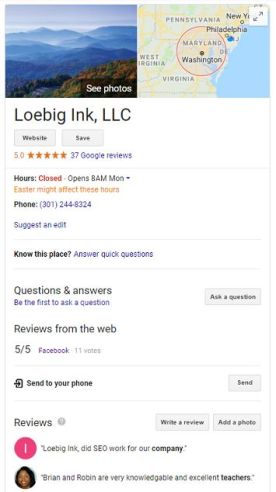


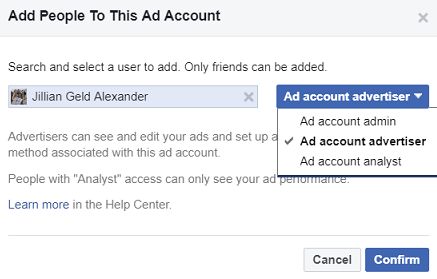
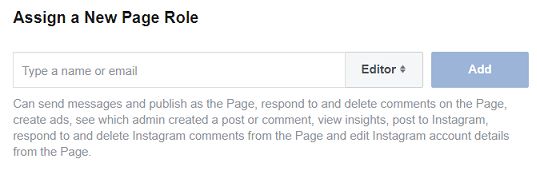
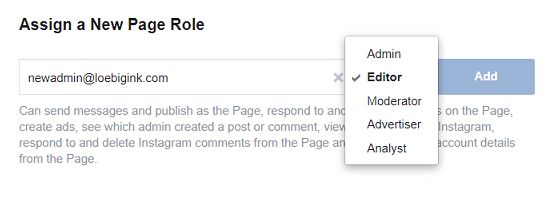
 As a small business grows in size and complexity, it will often begin enlisting others to help support its efforts. Social media management is a natural area of any business to benefit from a professional marketing consultant. To that end, it may be become necessary for someone else to act as an administrator of a business Facebook page.











 Creating a LinkedIn business page is a key component of a complete local business internet marketing strategy. LinkedIn is the top social media site for business professionals and LinkedIn business pages provide a unique opportunity for a business to showcase its products and services in a professional manner. Regular updates can be shared with followers on a business LinkedIn page and built-in analytic tools allow page owners to measure the impact they are having on this social media platform.

 Facebook Ads Manager gives you the ability to create ads that appear in the Facebook feeds of people who are likely to be interested in your service or product. The feature allows you to compose ad copy, select images, choose who you would like to see your ad according to demographics and interests, boost Facebook posts, and set factors such as start and end dates for the ad and total money spent. You can create ad campaigns specifically designed to achieve a goal such as raising awareness of your website, making sales, or increasing attendance for an upcoming event.






 The Ink Blog