Use the “BCC” field for Mass Email

Please use the “BCC” field when sending mass email!

I often receive forwarded emails from my Mother or friends who like to share the latest funny or inspirational message they have seen making its way around the web. And I sometimes enjoy being included, but there is a better way to send mass emails to your group of friends without violating the confidentiality of their personal email addresses.

Sending an email to a large group of people using the “To:” field in a message is like writing your friends’ phone number or address on a public bathroom wall! Why would you share someones private email address with a group of strangers when many of them will also forward the same addresses to even more strangers? A better solution is to use your email program’s BCC function.

BCC means Blind Carbon Copy. It provides a way for you to send messages to groups of people without disclosing their email addresses to the group. You can place your own email address in the “To:” field and put your group of friends in the “Bcc:” field.

Here are just a few good reasons to use the BCC field:

  1. CONFIDENTIALITY: Using BCC protects the recipients’ private email address from being spread to strangers
  2. SPAM: Using BCC helps prevent your friends from receiving spam.
  3. CLEANER CONTENT: Using BCC keeps your sent messages cleaner since it removes many extra lines of email addresses from the content
  4. FASTER SENDING: With less content, messages can be downloaded and sent faster

How to use the BCC field:

  1. Webmail:In most email clients, the BCC field is already visible. Create a new message in webmail browser, click BCC.
    1. Gmail and Yahoo Mail!: click add BCC.
    2. Hotmail: click Show Cc & Bcc.
  2. Outlook Express: To activate the BCC field in Outlook Express, create a new message and choose “View…All Headers”.
  3. MS Outlook: To activate the BCC field in MS-Outlook, create a new message and choose “View…BCC”.

Of course there are good reasons to send a carbon copy (cc:) of an email to others such as:

  • You need everyone to know each others email address
  • The email group needs to collaborate or respond to each other via email

Be considerate and also let me know other good reasons to use the BCC field and I’ll add them to the list! Contact me through my email form here…

Share this article with your friends and family if you need to encourage them to use BCC. Click on the sharing icons below, or send them this short link: http://bit.ly/bcc_field

Posted in How To..., Marketing | Tagged , , , , , , , , | 9 Comments

Meta Tags for SEO

meta tags for seo

A small business should take the time to review their website meta tags and also research the best keywords for their industry and target geographical markets. Meta tags have limited impact on search engine placement, but attention to the top three meta tags; title, keyword and description, will help maximize your SEO strategy.

[This article is reviewed yearly to ensure relevancy with Google algorithm updates and SEO best practices. Last update: 5/22/2015]

Title Tags

  1. Title tags remain the most important meta tags that are used by all search engines. The title tag appears at the top of a browser and is also the default phrase that appears when a page is bookmarked.
    1. Be clear and concise with the wording of each page’s title tag.
    2. It is best to begin with primary keywords that describe the page content, then a secondary keyword/phrase followed by the website name such as “Webinar Training | Virginia Web Meetings | The Ink Blog.” WordPress creates a a page name blog name style by default, e.g. Page Name | Blog Name.
    3. Limit the title tag to 60 characters which is “usually” the maximum shown in Google search results.

Keyword Tags vs. Keywords Used for SEO

Keyword tags are no longer recommended for use in websites. Google ignores them and savvy competitors will easily see the keywords you are trying to optimize for your website. Instead of using keyword metatags identify a set of keywords for each page of the website.

  1. Limit each page to one or two keyword combinations.
    1. Targeting multiple keywords on a single page will prevent Google, and even your customers from determining what the primary purpose for the web page.
  2. Make keywords specific to the content of each page. Don’t use the same set of keywords on every page. Making them unique to each page will increase the relevance of the keywords and increase the validity of your site for search engines and visitors.
  3. Shy away from the use of a single keyword for optimization unless it is incredibly unique, e.g. “Dentist” is good as a single keyword. People seldom use a single keyword in searches and single keywords usually have millions of results making your site rank high for it next to impossible. For example, “business” is a much too broad and unspecific keyword.
  4. Use SEMRush.com or the Google Keyword Planner Tool to choose the best keywords for each page.
    1. Many websites often have many keywords which have little relevance for your site. Just having a city or county name as a keyword by itself will not increase your site’s SEO ranking for those words since someone typing in “Philadelphia, PA” in a Google search is most likely not looking for a specific business or service. If they were , they would most likely type in the name of the service they are searching.

Description Tags

  1. Description tags are still relevant since many search engines including Google sometimes use this tag to begin the description of your site in search engine results. Facebook also used the description tag of a site when a URL is pasted into a status update.
    1. Limit the description to one or two sentences that best describe your website. Google displays about 160 characters of text in the search results so the first 15 words in your description are critical. [Google is experimenting with much longer meta description tags, but we recommend focusing on 160 until the longer number becomes the norm.]

Header “H1” Tags

H1 tags are the header descriptions found on a web page. This blog article’s header tag/title, ‘Meta Tags for SEO” is assigned an H1 tag by default by WordPress. Make sure there is only one H1 tag on each page and include the most important keywords that describe the page content in this tag. Google and other search engines look for this tag to help determine if the content of the page is relevant to a search.

Meta Tag Coordination

Another best practice is to coordinate keywords across metatags. If the title tag, description tag and H1 tags all contain at least one word in common, search engines will determine that your site is highly relevant for the keywords being searched! Primary keywords should also be place at the front of each metatag area for the greatest impact.

There are many other ways to increases your SEO rankings. One of the most effective ways is to increase the number of other websites linking to your website.  This can be accomplished most effectively by developing links to your website by other popular websites like trade associations, membership organizations, and business partner websits. Listing your business in local directories doesn’t have the same SEO value as a business website link, but it does increase the overall positioning of your website on the Internet.

Read TheInkBlog article on promoting small business on the web by using website directories.

Read more information about some Basic SEO strategies too!

Posted in SEO, Web Design | Tagged , , , , , , , | 13 Comments

Sample Strategic Internet Action Plan

Internet StrategySmall business owners often search for quick examples of real life action plans, marketing strategies and case studies. This action plan, which was called an ‘internet strategy’ by the businesses from which it was gleaned, highlights some of the key areas of improvement that were targeted for development over the course of a fiscal year.

Identifying information has been removed for confidentiality purposes.

  1. Search Engine Advertising
    1. Expand Google Adwords budget and targeted ads
      1. Select key product/service groups to highlight
      2. Create a new web landing page(s) as the destination page of the new ad campaigns
      3. Implement “conversion tracking” on key ads
    2. Expand campaigns to Yahoo/Bing
  2. Newsletter Marketing
    1. Create a second newsletter and distribution list for an important customer segment
    2. Create an annual plan for newsletters that target special occasions, offers and deals throughout the year
      1. Holiday-themed Newsletters: Independence Day, Halloween, Memorial Day, Christmas
      2. Social media promo/invite newsletter
      3. New product/service announcement
      4. Two newsletters/mo.
        1. One general and one targeted
      5. Online Surveys
        1. Expand strategy for capturing and measuring customer experiences
        2. Auto add new customers to newsletter email list
          • When new email is added an auto responder would be sent with a link to survey.
          • Followup positive reviews with links to online review sites
  3. Internet Advertising
    1. Choose an internet advertising firm for expanded banner ad strategy
      1. Example: Richmond Times Dispatch
  4. Crowd Sourcing
    1. Consider using and/or promoting Foursquare, GroupOn, etc.
  5. Social Media
    1. Create a Google + page for the business
    2. Geo-location check-in deals
    3. Facebook
      1. Increase daily ads budget by 15%
      2. Continue offering weekly prizes
      3. Create quarterly prizes for bigger gifts
      4. Encourage staff to ‘like’ our FB page and ask them to invite their friends to ‘like the page and interact with fans.
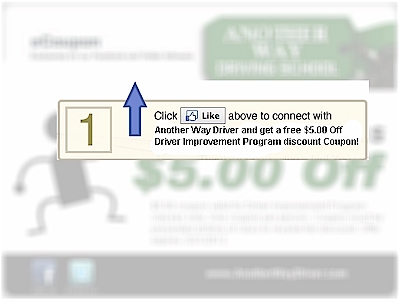
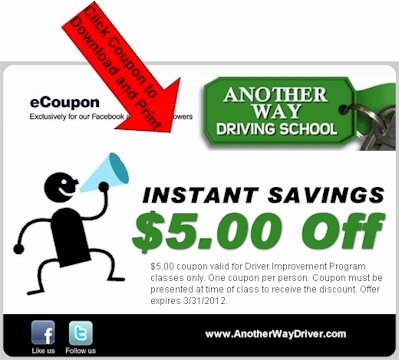
      5. Create exclusive coupon(s) for Facebook fans using a reveal tab.
        1. Example: Another Way Driving School
    4. Linkedin
      1. Encourage key staff to sign up for an account and list the business as their place of employment
    5. YouTube
      1. Create a second channel to solely highlight products/services
      2. Create a schedule for publishing videos
  6. Referral/Review/Local Directory Sites
    1. Claim free local directory listings on key local sites
    2. Consider upgrading key local listings
      1. YellowPages.com ($50/75/104/144/mo)
  7. Content/Article Marketing
    1. Cross post product inventory and blog articles on other websites
      1. Example: Ezinearticles.com, eBay, Craigslist, etc.
  8. QR Code Expansion
    1. Use in print-based advertisements and on product packaging
  9. Existing Website
    1. Improve home page layout and overall navigation
    2. Create mobile version of site
    3. Create expanded pages for key products/services
  10. New Websites
    1. Create an affiliate website that targets a key product/service
Posted in Marketing, Social Media, Web Design | Tagged , , , , , , , , , , | Leave a comment

How to Create a Facebook Reveal Page (Using the My Tab App)

FB Reveal page using My TabOne of the most highly touted strategies for growing fans by Facebook Marketing experts is the use of a Facebook ‘reveal tab’ with a mandatory “like” option. A reveal tab with mandatory “likes” is a Facebook page that invites visitors to see additional content by requiring that they “like” the page. This strategy is being used by many organizations to give away coupons, offer free e-books, enter drawings and sweepstakes as well as numerous other uses.

Organizations such as Wildfire Interactive have successfully developed pricing strategies around this advanced Facebook functionality as a way to offer increased value to their customers. Wildfire’s Promotion Builder product offers ‘mandatory likes’ only in their highest level, and most costly,  custom service.

This article will take you through the basic steps needed create a Facebook reveal page with mandatory likes.

Create the Two Images that will be used on the Reveal Page

  1. The first, and most difficult step to creating a reveal page is to design the two graphic images that will be displayed on the page. The first graphic will invite visitors to click “like” in order to reveal the special offer. The second graphic will reveal the offer. Both images must be 520 pixels wide, but they can be much longer in height. Keep in mind that visitors should not have to scroll down the page to view the primary message of the image.
  2. A common technique for developing the first visible image is to actually blur the second target image. Blurring the image that is going to be revealed gives the visitor an idea about what will be revealed.  The invitation to like the page is then positioned over the blurred image
    1. Blurred image
      Facebook Reveal Image A
    2. Revealed Image
      Facebook Reveal Image B
  3. Once these two images are created upload them to a live web server. You will need to point to these images in the hmtl coding in later steps below.

Add the My Tab App to your Facebook Page

  1. Go to: https://www.facebook.com/revealtab/app_14167664298
  2. Click “Install the Application”
    my_tab1
  3. On the page titled “My Tab would also like permission to,” click “Allow”mytab3
  4. On the next “Chose Your Page” window, select the page you would like to install MyTab. If you only manage one Facebook page only one will be in the list.mytab4
  5. Once clicked, a red box asking you to ‘install the application to this page appears. Click the link in the red box to continuemytab5
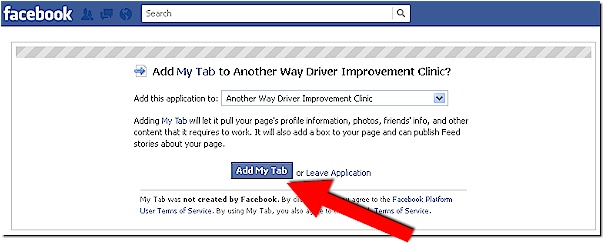
  6. The next page confirms that you wish to add My Tab to the page. Click “Add My Tab”mytab6
  7. Once clicked, the tab is installed on the page and you will be taken to the Facebook page where it is installed. Click on My Tab to continue the setup process.mytab7
  8. A sample “Thanks for Liking our page” graphic will appear from My Tab. Click the text that says, “change this content to be your custom landing page” which will take you to the Apps page.mytab8

Edit the Name of your Reveal Tab

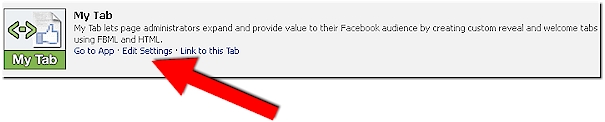
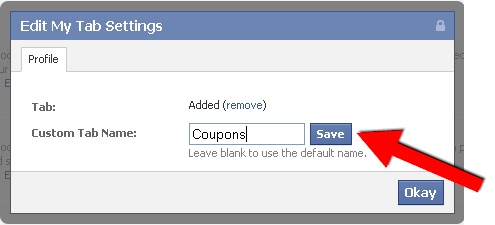
  1. On the “My Tab” app click “Edit Settings” which will bring up a popup window allowing you to change the name of the tab. Click save when finished.mytab9
    mytab10

Edit Default and Reveal Tab Content

  1. Click on the “Go to App” link to edit the content of the tab.mytab11
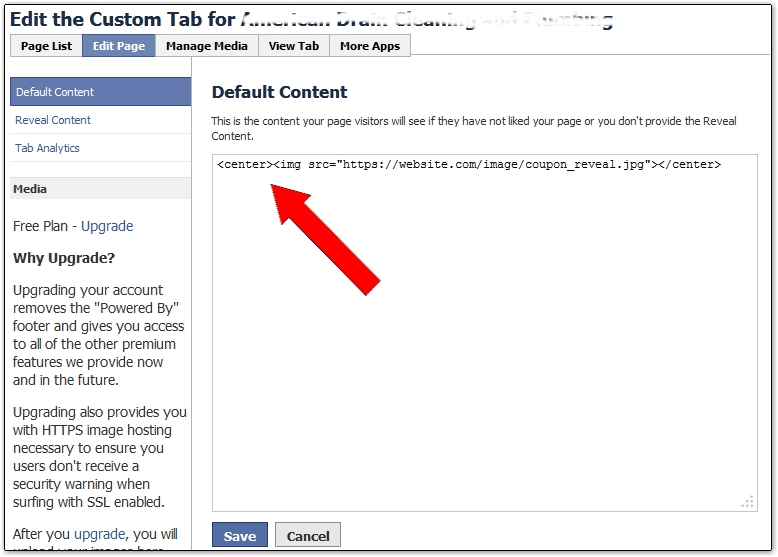
  2. In this default content tab page add the html code that points to the image that will appear to visitors who have not yet liked your page. If you are pointing to an image that is not located on a secure server using the “https” protocol a warning message will appear informing you that a significant percentage of users will see error security warnings when visiting your page.  An invitation to upgrade to the My Tab premium plan will be offered, but is not required. (See last step in this article for premium pricing and features.) When finished click ‘save.’
    mytab html
  3. Next, click the “Reveal Content” navigation button at the top left of the App to setup the reveal image using html.mytab13mytab reveal html
  4. If you are using the MyTab App for promotions or even coupons make sure you read and comply with Facebook Guidelines for conducting promotions on Facebook pages (Section III.E.).  Here is sample of indemnification language you can modify, expand and add to the ‘reveal content’ page.
    1. “This promotion is in no way sponsored, endorsed or administered by, or associated with, Facebook. You are providing your information to [Company Name] and not to Facebook. The information you provide will only be used for providing you with a coupon for future services. By downloading this coupon you are releasing Facebook from any responsibility or liability related to this promotion.”

Setup Google Analytics

  1. If you use Google Analytics to track traffic on your website, you can insert your Google Analytics account ID so that it will track your tab visits as well.
  2. You can find your Google Analytics ID on the Anaytics Account Home page.mytab15
  3. To setup up analytics, click the “Tab Analytics” navigation button at the top left of the App.mytab16
  4. Enter your Google tracking code and click save.

Move the Reveal Tab to a preferred position on your Facebook Page

  • Facebook allows business pages to change positions of the tabs that appear below the header image of the page. Mouse over the new MyTab that appears on your page and click the ‘edit’ pen. Then select ‘swap positions’ with one of the other tabs. The ‘photos’ tab is the only one that cannot be changed.
    mytab17

Consider Upgrading

  • My Tab provides this reveal tab free for a maximum of 8 Facebook page installs. An upgraded version can be purchased for $7/mo per page. The upgrade removes the ‘powered by My Tab’ link on the page, and provides 5mb of https image storage for each page install.

Live Examples!

Installation Help?

Posted in How To..., Marketing, Social Media | Tagged , , , , , , , , , , , , | 26 Comments

How to Encourage Positive Internet Reviews

Review SitesBusiness review sites continue to proliferate the web.  Local directories and search sites have joined the customer review bandwagon of dedicated review sites such as Angie’s List, Yelp and DealerRater.  As a result it is becoming increasingly important for businesses of all sizes to devise a thoughtful strategy to encourage positive internet reviews and maintain control of their internet reputation.

Popular review sites such as Yelp.com, DealerRater.com, and Local.com have strict policies about reviews in order to maintain the legitimacy of their brand. They strongly advise against asking customers directly for positive reviews. Posted guidelines suggest that reviews are best when they happen organically. However, businesses are motivated to seek out the best and most positive reviews in order to maximize their online reputations.

The following recommendations are biased towards the interest of the business, but remain ethical and transparent. Since these ideas are relatively generic, specific strategies need to be tailored to the particular industry and customer.

  1. Ensure customer comment cards and surveys ask for an email address, then followup on all positive surveys pointing them to your preferred review site.
  2. Train staff to encourage customers to visit your website to post comments on a survey page (web address on a receipt works well).  Then, followup on all positive comments with links to the review site. Followup on criticisms with good customer service.
  3. Pass out note cards with an invite to rate the business on the review site and reward and/or recognize staff who do this well.
  4. After making a sale, invite the customer to visit the site and make a comment.
  5. Have a kiosk, tablet or computer available in the business for clients to post reviews.
  6. Invite people who make positive comments via the web, word of mouth or social media to make their voice public on a review site.

For more specific ideas on strategies for your particular business drop me a note or comment on this blog with your own ideas!
www.loebigink.com/ink/contact.ashx

Posted in How To..., Marketing | Tagged , , , , , , , , , | 3 Comments

Great Tech Tools: Wildfire Social Media Monitor

Wildfire LogoWildfire Social Media Monitor
http://monitor.wildfireapp.com/

What it is:
Wildfire’s Social Media Monitor is a free web-based tool for tracking the growth of business Facebook and Twitter pages. The tool lets you compare the growth of friends and followers against your competitors and will provide regular email alerts of your social media growth in a chart sent directly to your email.

How we use it:
We use Wildfire’s Social Media Monitor to track the growth of business Facebook pages and also use it to share the impact of Facebook ad campaigns and Wildfire App contests. We often research local or regional competitors who have business Facebook pages and include those businesses that are similar in fan size to the business we are managing. Then, as Facebook fans grow and strongly outpace the initial list of competitors we will create a new comparison to match competitors who have higher numbers of fans and/or similar growth rates.

In the example below we compared Mooers Volvo Facebook fan growth to local luxury vehicle dealership competitors. We initially left Lexus of Richmond off the list since their fan base of over 4000 was so much higher than all local competitors.

Volvo comparison to local competitors

Then, after conducting a Wildfire Promotion Builder/fan contest and developing regular, low-cost, Facebook ads, growth rates quickly outpaced local competitors. As a result, a new Wildfire comparison helped us benchmark Mooers Volvo against some of the top national Volvo and non-Volvo dealership Facebook pages.

Volvo comparison to national competitors

We also use the Wildfire Social Media Monitor to keep track of all the Facebook and Twitter accounts that we manage which is very handy!

Specifications:
The program works across all browsers .

Cost:
Free. Comparing social media pages in Wildfire’s web-based application does not require a fee or even a membership account. However, to save and receive regular alerts about performance comparisons an account can be set up with just a name, password and email.  There are currently no fees for an expanded version of the Social Media Monitor. The full tool is free for all.  🙂

Full Disclosure:
We do not make any money or referral bonuses for reviewing or recommending this product.

Posted in Great Tech Tools, Social Media | Tagged , , , , , , , | 7 Comments

Basic SEO Ideas

SEO BasicsVolumes have been written on search engine optimization. Free ebooks and blogs about increasing results abound. In the spirit of the season here are a few basic best practice tips to adorn your technological tree in anticipation of more virtual visitors.
  1. Make sure you have metatags on all of your web pages especially keywords, content type and description tags.  Although Google doesn’t use most of them anymore many other search engines do so its best to cover all your bases.
    • Take some time and improve the keyword metatags you are using for your web pages. Google has a great tool for testing and evaluating keywords: https://adwords.google.com/select/KeywordToolExternal. As a general rule single words are usually not helpful. Also, remove or expand keywords that are too broad or general. For example, if you are an author, these keywords need updating:
  • short stories
  • Kindle
  • Nook
  • writer
  • author
  1. A blog site is an excellent way to increase SEO results. Just make sure you post regular content. Search engines like fresh content!
    • If you already have a blog on your website, another idea is to consider moving your blog page off of your main website and into a blog service like WordPress or Blogger and then associate it with a unique URL.  (TheInkBlog.net is a good example of this strategy) This will allow you to reach and refer a new and wider audience back to your website and any other content you may have.
  2. The single most important way to increase search engine ranking is to increase the number of other websites linking to your website.  Therefore, having Facebook, Twitter, external blogs and other pages that link to your main website is critical.  Another way to increase inbound links is to get listed in local directories such as Yahoo Local, SuperPages, Manta, etc. Check out a recent blog post on this idea: https://theinkblog.net/2011/11/04/promoting-small-business-on-the-web/
  3. Linkedin.com is another great tool for increasing SEO.  After setting up an account and connecting with colleagues and friends, scan the suggested list of ‘people you may know’ to continue expanding your reach. Linkedin also has some great tools that will allow you to auto post blog articles.  You can also post updates and announcements relevant to your business.
  4. Developing a Google Adwords campaign, if you don’t already have one, is a sure fire way to gain exposure in search listings. You will be able to see what the pay-per-click (PPC) cost will be to rank highly on various keywords related to your business. It will also help you round out your business marketing strategy.  Here is a brief article on Internet Advertising. https://theinkblog.net/2011/11/08/small-business-internet-advertising/.
Posted in SEO | Tagged , , , , , , , , , | 15 Comments

Small Business Internet Advertising

Internet AdvertisingAdvertising on the internet continues to outpace traditional sources of advertising for many business industries. Even mature industries like vehicle dealerships have shifted their advertising budgets from 80% newspaper to 80% internet over the past several years. Most still use radio and TV media, but extending that reach into radio and TV sponsored websites continues to increase.

The benefit of internet advertising for small business is that the cost of participation is significantly lower than traditional forms of advertising. Many internet sites also make it easy for the small business owner to access, learn and develop comprehensive ad campaigns. The following sites are recommended for potential inclusion into the marketing mix of most small, and even large, businesses.

Craigslist.com: http://richmond.craigslist.org

This site is a great source of free advertising that most small businesses should consider using. Small businesses such as home day care providers, music lessons and other personal services are prime candidates for Craigslist.  Ad posts can be categorized by specific service or product and can be relisted each month free of charge.  A clear and concise description of the service, price, location,  and service times should be listed along with  a link to an up-to-date website.

DaySong StudioCraigslist Success Story: Melody Day of DaySong Studio in Charlottesville, VA began her piano and vocal lessons business after leaving the music department of the local public school system as a result of arts funding cuts. She needed a way to get her business off the ground with a small advertising budget quickly. Along with vehicle placards designed by Peregrine Associates (see image) we recommended that Melody use Craigslist in Charlottesville to advertise her business locally. Her first un-referred client came from Craigslist and she continues to receive new leads and students monthly from this medium.

Google Adwords: www.google.com/adwords

Google is the most popular website for advertising on the internet. Fees are based on a pay-per-click or pay-per-impression daily budgeted amount. Ads need to follow strict guidelines for approval and are limited to text with no pictures. The ads appear in Google Search engine results and appear at the top of search results or down the right side of the search.

Google typically provides $75 to $100 of free advertising coupons to businesses that sign up for a new Adwords account and the steps to develop an initial ad campaign are fairly straightforward. Ad campaigns can become significantly complex with the vast array of analytics and tools available in Google and experienced campaign managers can become certified in Google Adwords.

Bing.com/Yahoo.com Advertising: http://advertising.microsoft.com/small-business/home

Yahoo Search and Bing.com are managed by the Microsoft Advertising adCenter. This dual-search engine advertising service is similar in design and fee structure to Google Adwords and has the added benefit of being able to import entire Google Adwords campaigns.

Facebook Ads: https://www.facebook.com/advertising/

Facebook ads are an excellent way to expand a businesses social media presence by growing business page “likes.” Ads are pay-per-click or pay-per-impression daily budgeted amount and utilize only keywords that appear somewhere in Facebook allowing for a higher degree of relevant targeting. Ads must follow certain guidelines and are listed along with thumbnail images that appear along the right had side of Facebook user pages.

There are many online resources, including TheInkBlog.net and Facebook guidance, for developing best practice Facebook ads.  However, the best advice is to jump right in and begin experimenting with ‘ad creatives’ and ‘ad copy.’

Mooers VolvoFacebook Ads Success Story: Mooers Volvo in Richmond and Midlothian, VA had less than 60 Facebook fans before striking out on a comprehensive social media strategy. With the use of a few targeted Facebook ads and regular relevant posts and interaction by Mooers staffers, the number of Facebook friends, between the two dealership Facebook pages, has increased to over 3000 in a few months with a budget of less than $8 per day. Ads invite visitors to post vehicle pics on the Mooers Facebook wall or requests that they visit and browse offers on the page.
Posted in Marketing | Tagged , , , , , , , , , | 8 Comments

Promoting Small Business on the Web

The four P’s of marketing are:

  1. Web PromotionProduct/Service – Product is the tangible good or intangible service that is produced by the business and consumed by the customer
  2. Price – Price is the amount a customer pays for the product
  3. Place – Place is a way of getting the product to the customer and/or how easily accessible it is to customers.
  4. Promotion – Promotion represents all of the communications that a business may use in the marketplace. Promotion has four distinct elements: advertising, public relations, personal selling and sales promotion.

In my experience, micro-businesses and small business start-ups pay a great deal of attention to the first three P’s of this marketing paradigm, but promotion often gets short shrift due to low budgets and limited experience with advertising and promotion.

The beauty of the internet for a small business is that it is a great equalizer for businesses of all sizes. A small business can promote itself using the same tools that a big business uses without spending big business prices. There is a wealth of free and low cost promotion-related resources on the web. The trick is finding the right ones and having enough time to learn, navigate and connect your business with these resources!

The following is an overview of key sites where a wide array of businesses can enhance promotion efforts on the internet. The hyperlinks provided next to each site will take visitors directly to the business sign up page.

  1. Google Places (http://www.google.com/places)
    1. This is often the first and most important location a local business should list or claim their existing business listing. If you have a physical store or business location Google Places is key to ensuring you can be found by your customers since the listing is tied into Google Maps.
  2. Local City Directories (e.g. http://directory.richmond.com/VA-Richmond)
    1. Most midsize and larger cities have popular city directories that promote local business. Richmond.com is a directory operated by the city’s largest daily paper, the Richmond Times Dispatch. Free business listings on this site allow users to add phone numbers, business hours, types of payments accepted and categories associated with the business.
    2. Like most free directory listings, enhanced listings can be purchased for a fee. Here is an example of a paid listing on Richmond.com: http://directory.richmond.com/2689893/Ace-Glass-Repair-Inc-Richmond-VA
  3. SuperPages.com (https://yellowpages.superpages.com/profiler/login_import.jsp)
    1. Super Pages is the internet version of the traditional yellow pages phone book. Similar to Google Places, many existing businesses are already listed in the Super Pages directory. If you business is listed you just need to “claim” your business and update the listing.
    2. Free listings include address, phone, website link, embedded Bing map, customer reviews, and the ability for visitors to share the listing via email, Facebook, Twitter, and mobile phone.
    3. Paid listings include a business description, listing categories, specialties, payment options, products/services, hours of operation, large thumbnail image of website, embedded video, etc. Prices are not published, but can reach several hundred dollars a month.
  4. Yahoo Local (http://listings.local.yahoo.com/)
    1. Yahoo Local is an important site to list a business since it is connected to the second largest search engine on the web. Basic/free listings include phone, address, website, store hours, products and services.
    2. An enhanced/paid listing is $9.95/mo and includes a company logo, tagline, up to 10 photos and a detailed business description.
  5. PR.com (http://www.pr.com/promote-your-business)
    1. PR.com is a press release website where you can announce the opening of your business, new service offerings, etc.
    2. Free listings include a press release title, summary and full length message.  The city, state and country selections are also free as is basic contact information.
    3. Enhanced listings allow hyperlinks in the body of the message as well as business logos and more targeted distribution areas.
  6. Manta (http://www.manta.com/member/register/?rl=join_free)
    1. Manta claims to be the largest online community dedicated to small business. Owners can list their business in the Manta directory for free and take advantage of networking, articles and numerous small business resources.
    2. Free listings include contact information, website link, business description, 3 business categories, products/services, years in business, state of incorporation, NAICS and SIC codes, etc.
    3. Enhance listings range in price from $29 to $49/mo and include more prominent listings, competitor add removal, multiple search keywords, etc. Compare plans here: http://www.manta.com/claim/upgrade?sub_driver=pbl-home-drawer
  7. Local.com (https://advertise.local.com/?CID=710)
    1. Local.com is a leading nationally positioned local business search site. It’s mission is “to be the leader at enabling local businesses an consumers to find each other and connect.”  Major search categories include: Businesses, Deals, Events and Activities.
    2. Free listings include business name, address, link to an embedded Bing map of the business location, phone number and website link.
    3. Premium listings start at $49.95/mo and include listing at the top of search results, company logo, special offers to customers, web page, 5 photos, two category listings and color in the business listing.
  8. Exactly Dat (http://www.exactlydat.com)
    1. ExactlyDat is a relatively new business directory that helps increase SEO results by allowing businesses to setup free listings that link back to their website. They use Google as their internal search engine and list businesses in discreet categories. Search results typically show up with a lead-in such as “I am looking for a plumber” (organist/web designer/etc.).
    2. Free listings include address, phone, fax, email, website, category listing and an overview of the business where the user can write a keyword rich description of their business.
    3. Paid listings have not been developed yet but will allow for additional categories to list the business.
  9. Merchant Circle (http://www.merchantcircle.com/corporate/)
    1. Merchant Circle claims to be “the largest online network of local business owners, combining social networking features with customizable web listings that allow local merchants to attract new customers.”
    2. Free listings include address, phone, embedded Google Map, up to three categories for listing the business, customer reviews and compliments as well as the ability of Merchant Circle members to “follow” your business on Merchant Circle.
    3. Paid listings include top search result positioning, business logo thumbnail image, social sharing buttons, website link, payment types, hours of operation, a simple blog, product descriptions, offers and recent news updates.
Posted in Marketing | Tagged , , , , , , , , , | 17 Comments

Online Reputation Management

Online Reputation ManagementCustomers are using online review sites at an rapidly increasing rate.  Traffic for the top  review sites have continued to grow quickly over the last year (Aug 2010 to Aug 2011):

  • Yelp.com (89% increase)
  • Google Places (58% increase in three months!)
  • Yahoo Local (58% increase)
  • CitySearch (60% increase)
  • DealerRater (86% increase)

Research from Cars.com in April of 2011 indicated that 73% of consumers consulted online dealership reviews and 91% of consumers said they would use reviews when deciding on a dealership.

As a result, small and large business alike cannot ignore the conversation that is already happening about them online. Learning to effectively manage the conversation and ones online business reputation, is rapidly becoming another cost of doing business in the digital age. Businesses can take basic steps to meet this challenge:

  1. Discover Reviews
  2. Request and Promote Reviews
  3. Manage Reviews

A. Discover Reviews

A quick Google search on ones business name may not uncover all the places a business is being reviewed, but it is a good place to start! Additional places to search should include:

B. Request and Promote Reviews

Invitations: Instead of waiting for random customers to talk about you on their preferred review site, invite them to help get your review presence moving. Linkedin recommendations are a good place for sole proprietors and consultants, but also consider pointing customers to the review sites that already have reviews posted about your business. Invite your facebook friends and customer email list to honestly comment on your services.

Surveys: Following any significant transaction or service, send your customers a followup survey asking for their opinion and feedback. Include links to the review sites you wish to promote.

Staff Participation: Ask your staff to solicit feedback and reviews from customers. Make customer feedback a regular employee expectation and review feedback in staff meetings. Financial or other incentives can help create a culture of hearing the customers ‘digital’ voice.

Display Reviews: Use customer reviews in web-based testimonial pages or strategically positioned quotes. Use reviews in both offline and online advertising and at multiple points in the sales and service process.

C. Manage Reviews

Monitor: Claiming your business page on the key review sites will allow you to receive notification of any reviews that are posted about your business. Enlisting the use of a listening tool such as Google Alerts (www.google.com/alerts) will also help notify you of conversations taking place about you and your business anywhere on the web.

Respond: Whether reviews are good, bad or neutral, responding to them in a timely manner will help improve your reputation and will also let your customers know that transparency is important to you. When reviews are negative always respond positively. Apologize and share information about what can be done to make things right. A good way to overcome a negative review is to encourage a large number of positive reviews.

Don’t Manipulate: Never create or solicit fake reviews! Review sites themselves are good at removing or hiding fake or fabricated reviews and your reputation will be significantly damaged if and when you are found out. Don’t offer direct incentives for positive customer reviews either. The best reviews should happen naturally as a result of the great service you are providing.

Managing an online business reputation is a cost of doing business, but it does not have to be unnecessarily costly! Following a few basic steps to discover how your business is being viewed and then managing the review process will keep your valuable reputation in tact.

Posted in Social Media | Tagged , , , , | 4 Comments