The four P’s of marketing are:
 Product/Service – Product is the tangible good or intangible service that is produced by the business and consumed by the customer
- Price – Price is the amount a customer pays for the product
- Place – Place is a way of getting the product to the customer and/or how easily accessible it is to customers.
- Promotion – Promotion represents all of the communications that a business may use in the marketplace. Promotion has four distinct elements: advertising, public relations, personal selling and sales promotion.
In my experience, micro-businesses and small business start-ups pay a great deal of attention to the first three P’s of this marketing paradigm, but promotion often gets short shrift due to low budgets and limited experience with advertising and promotion.
The beauty of the internet for a small business is that it is a great equalizer for businesses of all sizes. A small business can promote itself using the same tools that a big business uses without spending big business prices. There is a wealth of free and low cost promotion-related resources on the web. The trick is finding the right ones and having enough time to learn, navigate and connect your business with these resources!
The following is an overview of key sites where a wide array of businesses can enhance promotion efforts on the internet. The hyperlinks provided next to each site will take visitors directly to the business sign up page.
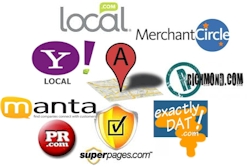
- Google Places (http://www.google.com/places)
- This is often the first and most important location a local business should list or claim their existing business listing. If you have a physical store or business location Google Places is key to ensuring you can be found by your customers since the listing is tied into Google Maps.
- Local City Directories (e.g. http://directory.richmond.com/VA-Richmond)
- Most midsize and larger cities have popular city directories that promote local business. Richmond.com is a directory operated by the city’s largest daily paper, the Richmond Times Dispatch. Free business listings on this site allow users to add phone numbers, business hours, types of payments accepted and categories associated with the business.
- Like most free directory listings, enhanced listings can be purchased for a fee. Here is an example of a paid listing on Richmond.com: http://directory.richmond.com/2689893/Ace-Glass-Repair-Inc-Richmond-VA
- SuperPages.com (https://yellowpages.superpages.com/profiler/login_import.jsp)
- Super Pages is the internet version of the traditional yellow pages phone book. Similar to Google Places, many existing businesses are already listed in the Super Pages directory. If you business is listed you just need to “claim” your business and update the listing.
- Free listings include address, phone, website link, embedded Bing map, customer reviews, and the ability for visitors to share the listing via email, Facebook, Twitter, and mobile phone.
- Paid listings include a business description, listing categories, specialties, payment options, products/services, hours of operation, large thumbnail image of website, embedded video, etc. Prices are not published, but can reach several hundred dollars a month.
- Yahoo Local (http://listings.local.yahoo.com/)
- Yahoo Local is an important site to list a business since it is connected to the second largest search engine on the web. Basic/free listings include phone, address, website, store hours, products and services.
- An enhanced/paid listing is $9.95/mo and includes a company logo, tagline, up to 10 photos and a detailed business description.
- PR.com (http://www.pr.com/promote-your-business)
- PR.com is a press release website where you can announce the opening of your business, new service offerings, etc.
- Free listings include a press release title, summary and full length message. The city, state and country selections are also free as is basic contact information.
- Enhanced listings allow hyperlinks in the body of the message as well as business logos and more targeted distribution areas.
- Manta (http://www.manta.com/member/register/?rl=join_free)
- Manta claims to be the largest online community dedicated to small business. Owners can list their business in the Manta directory for free and take advantage of networking, articles and numerous small business resources.
- Free listings include contact information, website link, business description, 3 business categories, products/services, years in business, state of incorporation, NAICS and SIC codes, etc.
- Enhance listings range in price from $29 to $49/mo and include more prominent listings, competitor add removal, multiple search keywords, etc. Compare plans here: http://www.manta.com/claim/upgrade?sub_driver=pbl-home-drawer
- Local.com (https://advertise.local.com/?CID=710)
- Local.com is a leading nationally positioned local business search site. It’s mission is “to be the leader at enabling local businesses an consumers to find each other and connect.” Major search categories include: Businesses, Deals, Events and Activities.
- Free listings include business name, address, link to an embedded Bing map of the business location, phone number and website link.
- Premium listings start at $49.95/mo and include listing at the top of search results, company logo, special offers to customers, web page, 5 photos, two category listings and color in the business listing.
- Exactly Dat (http://www.exactlydat.com)
- ExactlyDat is a relatively new business directory that helps increase SEO results by allowing businesses to setup free listings that link back to their website. They use Google as their internal search engine and list businesses in discreet categories. Search results typically show up with a lead-in such as “I am looking for a plumber” (organist/web designer/etc.).
- Free listings include address, phone, fax, email, website, category listing and an overview of the business where the user can write a keyword rich description of their business.
- Paid listings have not been developed yet but will allow for additional categories to list the business.
- Merchant Circle (http://www.merchantcircle.com/corporate/)
- Merchant Circle claims to be “the largest online network of local business owners, combining social networking features with customizable web listings that allow local merchants to attract new customers.”
- Free listings include address, phone, embedded Google Map, up to three categories for listing the business, customer reviews and compliments as well as the ability of Merchant Circle members to “follow” your business on Merchant Circle.
- Paid listings include top search result positioning, business logo thumbnail image, social sharing buttons, website link, payment types, hours of operation, a simple blog, product descriptions, offers and recent news updates.
 Customers are using online review sites at an rapidly increasing rate. Traffic for the top review sites have continued to grow quickly over the last year (Aug 2010 to Aug 2011):
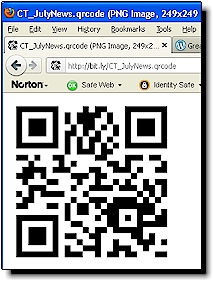 An additional feature on Bit.ly is the automatic QR code generator. Whenever a link is shortened a related QR code is automatically generated. QR codes are graphic images that can be scanned by a smartphone which then activates the content stored on the image such as a link to a website. This QR code feature is also available on Goo.gl, but the Bit.ly image is larger and an additional higher resolution image is also created and can be saved for use in newsletters, brochures, magazines or other offline media.
 Bit.ly just recently created an ability to toggle between two different views of the links in the control panel of the software. The traditional list view shows the current number of clicks on links along with the full and shortened URL’s and creation date. The detailed view provides this same info along with a preview of an image on the page being linked along with the page’s metatag description…very cool.
 Comm100 Live Chat
 The setup is fully customizable and can be branded with graphics unique to each website that we support with the software. We initially installed Comm100 Live Chat on the
  Other features include a “knock knock” sound when someone enters a page, that has the chat box installed, and a phone ring when someone requests a chat. The software has the ability to invite someone who is on the website to a chat by popping up an additional custom image that floats across their screen and we can easily switch from a text chat to a live voice discussion.
 CaptureWizPro
 on the computer by hitting the ‘print screen’ key on my keyboard it felt like an epiphany. CaptureWizPro uses that basic concept and launches it into outerspace! The “area” capture tool allows the user to select a small or large portion of a computer screen. The edges of the screen capture can be adjusted by clicking and dragging the edges of the capture area before it is copied or keyboard shortcuts can fine tune the adjustments one pixel at a time.
 Another highly useful feature is the ability of the tool to capture drop down menus on a website or other moving images that you would never be able to capture with the ‘print screen’ key. After installing the program, pressing F10 freezes everything on the browser window, and on your computer, so that you can position the ‘area’ tool to select exactly what you need to capture.





 The Ink Blog’s
 Twitter provides a great list of best practices for business on their
  and competitive insight, recruitment and retention of new customers and business partners, and a method for managing ones business reputation online. Key factors for social media success are: