Great Tech Tools: Bit.ly

Bit.ly – Link Shortener and QR Code Creator
http://bit.ly

What it is:
Bit.ly is a popular link shortening service which allows a user to shorten an otherwise long website URL into a very short link that can be shared via email, social networks, a website, mobile device or other media quickly an simply. Link shorteners are especially useful for micro-blogging sites like Twitter which only allow a limited number of characters per post. The value of link shorteners has caught on with many media sites like YouTube which automatically generate their own shortened links with the sharing features built into their applications.

How we use it:
Our technology team uses bit.ly almost daily to shorten and share long URL’s via email to clients and each other. Many of the products listed on our client content management system pages are comprised of long and sometimes complex URL’s. Bit.ly allows us to shorten that link and forward it to someone without running the risk of that link breaking apart in an email message.

The other more significant benefit is the ability to track statistics related to the shared links. Bit.ly has the most robust set of analytics for a free shortening service that we have seen. Google has its own shortening service called Goo.gl, but the stats available on Google’s product pale in comparison to Bit.ly. Stats include information related to all Bit.ly links created as well as each individual link such as:

  • Clicks per hour, day, week, two weeks, monthly and all time
  • Clicks by referring site and country
  • Links shared via Twitter tweets, Facebook shares, likes and comments

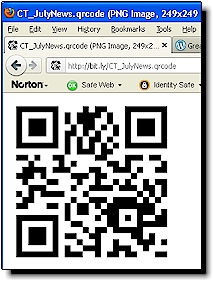
Bit.ly QR CodeAn additional feature on Bit.ly is the automatic QR code generator. Whenever a link is shortened a related QR code is automatically generated. QR codes are graphic images that can be scanned by a smartphone which then activates the content stored on the image such as a link to a website. This QR code feature is also available on Goo.gl, but the Bit.ly image is larger and an additional higher resolution image is also created and can be saved for use in newsletters, brochures, magazines or other offline media.
One of the dealerships we work with decided to experiment with QR codes, using a link shortening service, in order to assess their popularity and value prior to investing in the technology for its entire inventory of vehicles. A QR code generated by the link shortener was affixed to the window of a new vehicle parked in the middle of an outdoor mall. Initial results showed that 36 people scanned the image during the first week. The code linked back to the dealership website with details on the particular vehicle model. QR codes were also placed on all new sedan vehicle models. Results showed that people were coming onto the lot after hours and viewing vehicle details with smart phones. The possibility to connect with customers even after hours was an eye opener.

An additional key feature of Bit.ly is the ability to customize the shortened link to a more memorable name. For example, the automatically shortened QR code for one of our Criminal Thinking Therapy client newsletters is http://bit.ly/nxutQi. We customized the link so that is became http://bit.ly/CT_JulyNews instead. This great feature allows the recipient of the shortened link to know what the link is referencing. It also allows us to quickly decipher the destination of the link when reviewing them in the Bit.ly control panel.

A favorite feature of the software is the ability to create and shorten links with a single right click and paste. Once a free account is created, simply pasting a link into the link shortening text area automatically shortens it and adds it to our account history ready to begin tracking stats. Another click and it is copied to computer memory and ready for pasting anywhere.

Bit.ly toggle detail viewBit.ly just recently created an ability to toggle between two different views of the links in the control panel of the software. The traditional list view shows the current number of clicks on links along with the full and shortened URL’s and creation date. The detailed view provides this same info along with a preview of an image on the page being linked along with the page’s metatag description…very cool.

Specifications:
Fully cross browser compliant.

Cost:
FREE!

Full Disclosure:
We do not make any money or referral bonuses for reviewing or recommending this product.

Visit LoebigInk.com for additional screen shots including:

  • QR Code and stats info page
  • Click and paste area
Posted in Great Tech Tools | Tagged , , , , , , , | Leave a comment

Social Media for Small Business 101

This slideshow presentation provides an introduction to social media for small business. A thoughtful and planned approach using the Deming: Plan, Do, Check, Act paradigm is offered as a framework for small businesses beginning their entre into Social Media.

Key social networks, blogs and video sharing services are described with basic definitions as well as important “do’s and dont’s” when entering into the world of digital word of mouth.

A direct link to the Google Docs version can be accessed here and the complete presentation with speaker notes is available for $20.00. Let me know how I can be of assistance!

Posted in Social Media | Tagged , , , , , | 2 Comments

Great Tech Tools: Comm100 Live Chat

Comm100 Live ChatComm100 Live Chat
http://www.comm100.com

What it is:
Comm100 Live Chat is a professional tool that allows instant online communication between website vistitors and businesses, helping to promote sales and improve services.

How we use it:
We found this software after doing a Google search on live chat software. We were not initially planning to use a “free” product since we have had less than desireable experiences with free versions of meeting software.  (side note: We currently use fee-based versions of GoToMeeting and GoToWebinar by Citrix which work very well.)  But, we decided to experiment with Comm100 since we saw good reviews and our clients are always interested in free products that perform well.

The software has a desktop client version as well as a full-functioning web-based version. We opted for the web version since our support team, i.e. ‘operators,’ are from different cities and are often using more than one computer.  One of the important differences between a meeting-type software and Comm100’s live chat is that there is no java applet, visitor download or plug-in needed to make it operational. All that is needed is a browser with an internet connection. The software works on iPhone, BlackBerry and other Java-based platforms as well.

Admin PanelThe setup is fully customizable and can be branded with graphics unique to each website that we support with the software. We initially installed Comm100 Live Chat on the http://www.criminalthinking.net site, but shortly thereafter installed it on LoebigInk.com.  An unlimited number of websites can be monitored and supported from the same window/interface. The admin web panel lets us know which website a client is visiting. (See Current Page column in the above image) and an “Info” tab (below) shows details about each visitor:

Info PanelOther features include a “knock knock” sound when someone enters a page, that has the chat box installed, and a phone ring when someone requests a chat. The software has the ability to invite someone who is on the website to a chat by popping up an additional custom image that floats across their screen and we can easily switch from a text chat to a live voice discussion.

All this for free an we actually were able to speak with a live tech support person from Comm100 who answered all of our additional questions AND they sent us a followup message asking if we needed anything else! Five stars! With service like this Comm100’s customer base will continue to grow rapidly

Specifications:
Server Side
No matter if you are using Windows, Linux, ASP, ASP.NET, PHP, SQL Server, MySQL or any other technologies, you can fully integrate Comm100 Live Chat into your web site.

Client/Visitor side
Comm100 Live Chat supports all major browsers on all major operating systems, including IE, Firefox, Safari, Opera, Chrome on Microsoft Windows, Linux, Mac OS and so on.

Cost:
The Comm100 Live Chat software is totally free. There are currently, as of 7/27/2011, no advanced options available for purchase. When I “chatted” with their Tech Support and asked how they generate revenue, they said they provide consulting services to large organizations and call centers who use their software and they are developing additional features that can be purchased in the future. They also said all the current features of the software will always remain free.

Full Disclosure:
We do not make any money or referral bonuses for reviewing or recommending this product. However, since we use and recommend this software, we are participating in Comm100’s partner program through a reciprocal web page.  The reciprocal web page we developed for Comm100 is here.

Visit LoebigInk.com for additional Screen Shots including:

  • Live Chat hover button
  • Custom Live Chat Button
  • Pre-chat window
Posted in Great Tech Tools | Tagged , , , , , , , , | 5 Comments

Great Tech Tools: CaptureWizPro

CaptureWizProCaptureWizPro
http://www.pixelmetrics.com

What it is:
CaptureWizPro is a professional tool for capturing anything on your screen, even tricky items like the entire contents of scrolling areas, drop-down lists, tool tips, mouse pointers and screen savers. There’s also a high-performance recorder for capturing streaming video or creating demos.

How we use it:
This software is one of the most important tools I use throughout the day. Years ago when I discovered how to perform a “screen capture”CaptureWizPro Program on the computer by hitting the ‘print screen’ key on my keyboard it felt like an epiphany.  CaptureWizPro uses that basic concept and launches it into outerspace! The “area” capture tool allows the user to select a small or large portion of a computer screen. The edges of the screen capture can be adjusted by clicking and dragging the edges of the capture area before it is copied or keyboard shortcuts can fine tune the adjustments one pixel at a time.

CaptureWizPro MenuAnother highly useful feature is the ability of the tool to capture drop down menus on a website or other moving images that you would never be able to capture with the ‘print screen’ key. After installing the program, pressing F10 freezes everything on the browser window, and on your computer, so that you can position the ‘area’ tool to select exactly what you need to capture.


After capturing the area of the screen or website a menu of options on how to handle the captured image appears. Clicking the ‘email’ option automatically opens your email client with the image already attached. Or, you can use the ‘save as…’ button to save it to your computer.

The sticky note function is one of my favorite options. When clicking the sticky note after a capture, the image gets pasted into a small window that remains “stuck” in front of any browser or other window you may have open. This can be used to compare something you captured on a web page that you want to see while writing a blog so that you don’t need to keep going back and forth between windows, as I am doing right now!

Examples of how we use CaptureWizPro include:

  • Quickly grabbing small areas of a website and emailing it between technology group partners to show problems with coding.
  • Capturing images for posting in blogs and websites
  • Saving chat session messages that happened in a Facebook dialogue
  • Showing a client what a screen should look like on their browser
  • Developing training manuals with images captured from our content management system
  • Capturing video segments of news stories for the Red Cross of Central VA

Specifications:
Supports Windows 7 (64 and 32-bit), Windows Vista (64 and 32-bit), Windows XP (32-bit), Windows Server 2008, Windows Server 2003, Windows 2000, Window Me and Windows 98. Requires 5 MB harddisk space. 2 MB download.

Cost:
30 Day Free Trial, $39.95 one time cost for full version, $19.95 for the lite version

Screen Shot:
Visit Loebigink.com Great Tech Reviews for more details and screen captures of CaptureWizPro features.

Full Disclosure:
We do not make any money or referral bonuses for recommending this product.

Posted in Great Tech Tools | Tagged , , , , , , , , , , , , , , , , , | 1 Comment

Best Practice Tips for Facebook Ads

Creating effective Facebook Ads is more of an art than a science. A small business should experiment with several different types of ads and target audiences in combination with the attractive images and clear calls to action.

  1. Think concise, clear and attractive
    1. Create three or four ads that have a clear call to action or tagline and an attractive relevant image.
      1. Maximum image sizes for a FB ad are 110px wide x 80px tall
      2.  Facebook Sample Ad 1
      3. Sample Facebook Ad 2
      4.  Facebook Sample Ad 3
        Facebook Sample Ad 4
  2. Look at other FB ads for ideas
    1. Consider Facebook ads that are not from your same industry. Good ideas often come from thinking outside of our own industry’s box.
      1.  Facebook Sample Ad 5
      2.  Facebook Sample Ad 6
      3.  Facebook Sample Ad 7
      4. Facebook Sample Ad 8
  3. Use Facebook’s “Precise Interest Targeting”
    1. Precise interst targeting allows you to focus your ad on keywords and phrases that you believe will naturally connect people to your services or products.
    2. The wonderful thing about precise interest targeting is that you can only choose keywords and phrases that exist on people’s facebook profiles. And, Facebook will let you know the estimated reach of the keywords you plan to use
    3.  Facebook Precise Interest Targeting
  4. Choose the most relevant landing page for your ad
    1. You may want to point people to your website, but pointing them to a particular facebook page will allow you to track the ads performance using Facebook’s integrated analytics.
      1. If you want them to sign up for your newsletter point them to your Facebook page that has a newsletter sign up app installed
      2. Pointing them to a coupon page highlighted in your ad is also a good way to encourage ‘likes.’
  5. Select a manageable budget
    1. Using pay per click vs. pay per impression is the most useful choice for a small business since your goal is to bring people to your page.
    2. Choose a daily budget that doesn’t break the bank and allows you to make adjustments for an ad that doesn’t perform well.
    3. To save money, run your ad every other week instead of continuously
  6. Evaluate your ads performance
    1. Let the ad run for a week to get a full view of the ads performance since viewing rates vary from day to day. You may find that the weekend is the best time for your ad to run.
    2. If your clicks vs. connections numbers are vastly different, people are visiting your page, but not ‘liking’ it. Use this info as an indication that your ad needs to be changed to more effectively convert clicks to likes.
    3. Click through rates of .10% or higher are a good indication that your ads are fairly effective at bringing people to your page. Ads that have a click through rate of .05% or lower should be changed.
  7. Benchmark your site with your competitors
    1. WildfireApp.com has a wonderful, free, social media monitoring application that allows you to track the growth of your business page in relation to your competitors. http://monitor.wildfireapp.com/
    2. Here is a screen shot of Mooers Volvo’s two dealership FB page growth performance benchmarked with local competitors. Click to see the full size image.
    3. Social Media Monitoring
Posted in Social Media | Tagged , , , , | 3 Comments

Top 10 Mistakes in Small Business Web Design

top ten mistakes in small business web designThe Ink Blog’s
Top 10 Mistakes in Small Business Web Design

  1. Unclear purpose for the site
    1. Decide on one to two primary purposes for your site that are customer focused. Design your site around this basic principle and expand content in ways that support this focus.
  2. Out of date content
    1. Information that is time sensitive should be removed immediately from the site when the target date has passed. A news page can archive historical information to show visitors previously posted content
    2. Broken links are also a form of out of date content. Employ a link checking service to make sure there are no orphaned pages in your site or broken links to external web pages. Broken links severely reduce the credibility of a site.
  3. Poor navigation
    1. Make sure people can easily navigate to the primary content of your site. Standard pages that are expected on most sites include a contact page, about us and links back to the home page.
  4. Grammar and spelling mistakes
    1. Poor grammar and spelling errors reduce the professionalism of your site and make a website appear amateurish.
  5. Clutter
    1. Some sites try to put everything they offer on the home page in vast amounts of detail. Although Amazon.com is the poster child of a cluttered site, small business should focus on key points of information that encourage users to visit other pages in the site.  Clear calls to action will help engage new visitors and increase sales.
  6. Flash navigation
    1. Navigational elements that are not available in non-flash options are a huge mistake. Some browsers and smart phone still don’t use flash which will prevent them from accessing your site.
  7. Auto playing music, sounds or videos
    1. Sound elements that automatically play when a page is loaded can create many problems for your visitors.
    2. Some people may be visiting your site from a library or work and auto playing content can be distracting or embarrassing.
    3. Many people stream their own music and video over the web as well so when they visit your site the additional sound will conflict with the media they already have playing.
  8. Huge cropped images
    1. With the advent of Content Management Systems end users can easily add their own content and pictures to websites. Unfortunately, this means many people are adding pictures directly from their high resolution cameras onto their websites and cropping the images without actually changing the file size. This practice increases bandwidth usage by your web server and makes pages load more slowly for your visitors. Pictures also become grainy and less professional looking.
  9. Flash intro page
    1. Many graphic designers love creating graphically dynamic and visually attractive flash intro pages to a website. However, most users find them annoying after the first visit.
    2. Flash intros also prevent your root URL from being properly indexed in search engines since there is usually little relevant textual content for a search engine to catalog.
  10. PDFs where a web page should be
    1. Some websites are filled with PDF documents of primary content which makes navigation cumbersome for visitors.
    2. Search engines are doing a better job of listing PDF content in search results, but users are more likely to visit a search listing on a web page than one offered in a PDF.
    3. At a minimum, internal links in a website should indicate if a particular link will load a PDF document. At best, all primary content should be developed in html with print ready content available in PDF.
Posted in Web Design | Tagged , , , , | 3 Comments

Best Practice for Business Facebook and Twitter Fan Engagement

best practices for facebook and twitterTwitter provides a great list of best practices for business on their website. However, these guidelines are also relevant for business Facebook pages. Here is my retake on Twitter’s best practices from a small business or sole proprietor’s perspective:

  1. Share best practice information
    1. Share best practice information related to your area of expertise.
    2. Give away your best advice online and people will begin to see you as an authority and someone to go to for answers. An abundance mentality lets your followers know you have their best interests in mind.
    3. Subscribe to blogs in your industry and retweet or post selected articles that are relevant to your clients.
  2. Regularly monitor comments
    1. Monitor comments about your own small business, but also pay attention to comments about your clients business.
    2. Use Google Alerts to find out what others are saying about your customers and encourage them to listen as well.
  3. Ask meaningful and relevant questions
    1. Engage in dialogue with your customers and clients but don’t ask questions you already know the answer to which will always appear self-serving.
    2. Ask questions that will help you understand your customers. Use current topics to spark dialogue that will educate you as well as your clients.
  4. Respond to compliments, criticisms and feedback always!
    1. Apologize publicly and followup privately to resolve problems and respond as quickly as possible.
    2. Nutshellmail is a great listening tool for making sure your followers comments reach you in a timely manner. This is especially true if you are not connected to your online presence 24/7.
    3. Invite your vocal supporters to give you a recommendation on Linkedin or a review site such as Yelp, Superpages, Google Places
  5. Regularly reward your followers
    1. Provide special offers, coupons, discounts, giveaways and time-sensitive deals. This practice answers the question, “Why should I like your page or follow you on Twitter?”
    2. Occasionally select a first responder to a FB or Twitter post for a giveaway. They will be delighted and become engaged spokespersons for your site.
    3. Wildfire Apps is a great application for quickly developing an engaging promotion targeted to your specific customers.
  6. Champion your stakeholders
    1. Acknowledge feedback from your followers and ‘friend/follow’ their companies and businesses as well. Repost events and relevant information about your customers on your own social sites.
Posted in Social Media | Tagged , , , , | Leave a comment

Social Media Success in Small Business

Social media marketing benefits small business by providing an new channel for customer support, a means to gain customer and competitive insight, recruitment and retention of new customers and business partners, and a method for managing ones business reputation online. Key factors for social media success are:

  • ensuring the selected medium is relevant
  • providing real value
  • sharing meaningful content

When testing the social media waters businesses and entrepreneurs will be most effective when they move forward systematically. Borrowing from Edward Deming’s “Plan, Do, Measure, Act cycle”, initial steps to help in the process include:

  • PLANNING
    • Find out what your competitors are doing in social media.
      • Are they using Facebook, Twitter and YouTube?
      • Do they have a Linkedin page?
      • How are they using these media?
    • Create a written plan
      • What type of social media that you will develop first, second and third?
      • What will your schedule be for regular content review and posting?
      • What initial measurements will you use to track progress?
  •  DOING
    •  Implement the plan incrementally
      • Start with the most relevant content first
      • Focus first on content, second on relationships and then on sales
    • Listen to your customers, “likers” and followers
      • Respond to every post on every social medium, even if it is just a simple acknowledgement of their interaction
  • MEASURING
    •  Track your efforts and statistics
      •  Where you you having the most impact?
      • Which media are customers connecting to most?
      • What are you learning from your efforts?
  • ACTING
    •  Use the knowledge you are gaining from listening, implementing, and measuring and make adjustments to your strategy.
      • Where you you having the most impact? Increase those efforts!
      • Eliminate or focus on areas of weakness.
      • Experiment with new low cost technologies
      • Feel free to fail in your efforts and learn from those opportunities.
Posted in Social Media | Tagged , , | Leave a comment

The Ink Blog Debut

Loebig InkWelcome to the inaugural issue of The Ink Blog!

This blog will be dedicated to providing tips, tools and low cost technology solutions for sole proprietors, small businesses and non-profits that need as many low-cost and free resources and ideas as they can get!

I have been collecting tips and tools for my own technology/web consulting business and value the opportunity to share them with my clients, colleagues and whoever stumbles upon this blog.

Stay tuned for some social media tips that even the experts have a hard time figuring out.  Example: How do I get rid of duplicate facebook pages for my business that someone else created?

Peace,

Brian Loebig, Author

Posted in Uncategorized | 2 Comments